Make a Markdown table with aligned columns

A Markdown table starts with a heading row and a row of dashes. A vertical bar, also called a pipe (|), separates the cells. For a numeric column, put a colon after its dashes (---:) to line up the values on the right.
Try it with a walking club’s README. The table needs to keep distances in one column and show the meeting point Gate A | East car park in a single cell.
Paste the table into a preview
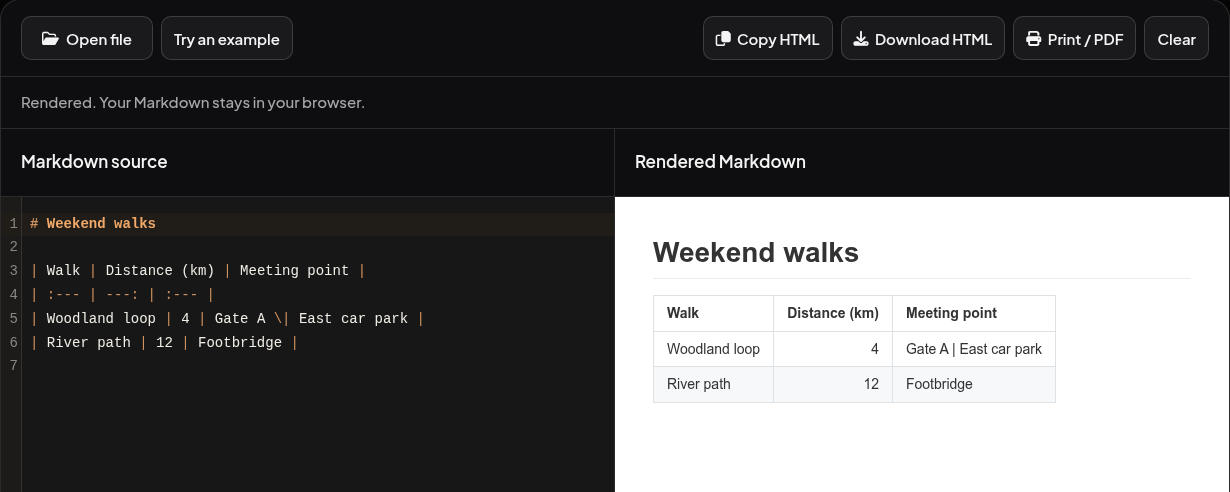
Open the Phoenix Code Markdown Viewer and paste this example into Markdown source. You can also download the example Markdown file and choose Open file. On a narrow screen, tap Preview to see the result.
# Weekend walks

| Walk | Distance (km) | Meeting point |
| :--- | ---: | :--- |
| Woodland loop | 4 | Gate A \| East car park |
| River path | 12 | Footbridge |
Look for three columns under Weekend walks. The 4 sits directly above the last digit of 12. The first meeting point shows a vertical bar between Gate A and East car park. The backslash is gone.
Change the alignment or add a row
The second line of the table controls how each column looks. Use :--- for left, :---: for center, or ---: for right. Leave a blank line between a preceding paragraph and the table, and keep one stretch of dashes for each heading. GitHub’s guide to Markdown tables.
To add another walk, put this line immediately after the River path row in the source. The preview should gain a third walk, with 7 under the other distances.
| Hill climb | 7 | West gate |
If part of a cell disappears, look for a pipe in its text. In this example, changing \| to | splits the meeting point and puts East car park beyond the table’s three columns. Put the backslash back to keep the whole name together.
Save the version you need
For a GitHub README, copy the Markdown source into README.md, save it, and use GitHub’s Preview when you edit the file there. To share a page someone can open directly in a browser, choose Download HTML in the viewer. Open the downloaded file and check the meeting point and distances once more. For a printed handout, turn your Markdown into a PDF.