Find and fix a trailing comma in JSON

In JSON, a comma tells the reader to expect another value or property. A comma immediately before the closing ] or } is a trailing comma and makes the file invalid. A comma inside quoted text is an ordinary character. Removing every comma can break the file and change your data.
Here’s how to find the extra comma in a list of stops, keep the place name Lake, north intact, and save the corrected file.
Find the error
- Open the Phoenix Code JSON Formatter. Paste the example below into Input JSON. If you’re checking a file of your own, choose Open file instead.
- Click Validate. For this exact example, the red message points to line 3, column 39. That position is the closing square bracket. The character immediately before it is the extra comma.
{
  "walk": "Woodland loop",
  "stops": ["Oak gate", "Lake, north",],
  "open": true
}
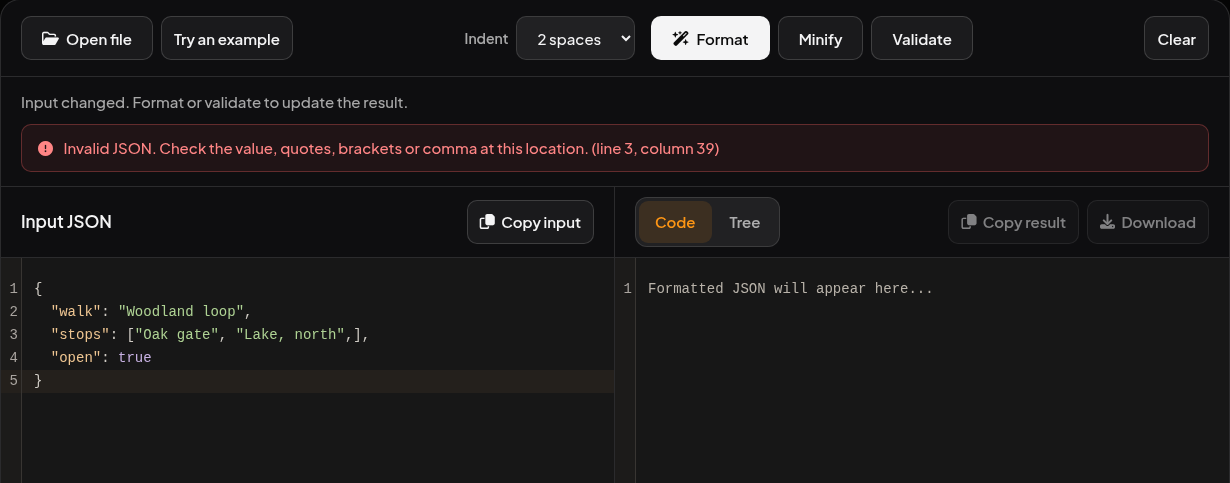
Remove the one extra comma
In Input JSON, replace the stops line with the one below.
"stops": ["Oak gate", "Lake, north"],
The comma between the two stops separates two values. The comma inside "Lake, north" belongs to the name. The comma after the closing ] also stays, because the open property follows on the next line.
Click Validate again. You should see Valid JSON. Then click Format and choose Download above the result. Open formatted.json from your downloads and check that the second stop still reads "Lake, north".
What if the error points to a closing brace?
The same rule applies to objects. For example, {"open": true,} has a comma after its last property. Change it to {"open": true}. A parser can report the closing character because that’s where it discovers the expected next value or property is missing. JSON object and array syntax.
If both versions of your file now validate and you want to see whether any values changed, compare the two JSON files.