Creating Extensions
This document outlines how to write your own extensions for Phoenix Code.
How to create a new Extension
Click on the link below and follow the instructions there to start: Create an Extension
API docs
Please refer to the links below for extension API docs and code references.
- Phoenix Code APIs - API Reference
- Take a look at our default extensions for code reference - Default Extensions
Running and Debugging your Extension
Follow the steps below to run and debug your extension:
-
Clone your extension repository onto the machine.
-
Go to https://create.phcode.dev. This is a development-focused version of the browser editor which shows non minified JS/CSS files in the browser developer tools.
-
Now, open the cloned folder in
create.phcode.dev.
Refer to this guide to see how to open a folder in Phoenix Code.
- Select
Debug > Load Project As Extension
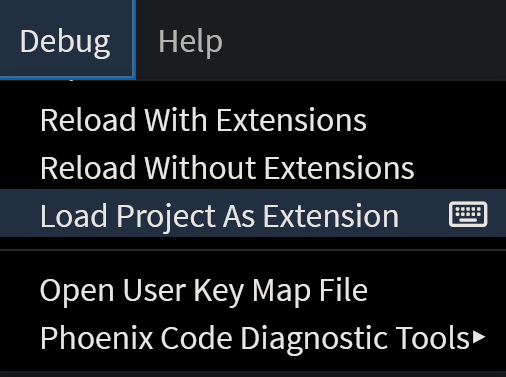
-
The extension will be loaded in Phoenix Code.
-
You can now make code changes and live preview them.
You can also select
Debug > Reload Project As Extensionto test the new code changes.
- When you are done developing the extension, select
Debug > Unload Project As Extensionto unload the extension.
You can use the browser developer tools to debug the extension.