Phoenix Pro for Schools & Universities (Free)
A large portion of the Phoenix Code community comes from schools and universities, where students and teachers value ease of use and a low learning curve. Education has always been central to our mission, and we want every student to have access to the full Phoenix Pro feature set without barriers.
For this reason, we provide Phoenix Pro for free to the entire education ecosystem, along with deployment tools tailored to classrooms, labs, and student devices.
Schools can deploy Phoenix Pro in two ways:
- Email-based automatic activation (recommended)
- Educational Volume License Keys (for labs, shared devices, and student/teacher-owned devices)
This page explains how schools and universities can obtain free Phoenix Pro access and deploy it across any devices used within the institution.
Who Is Eligible?
Phoenix Pro is free for:
- Students and teachers with .edu or .ac.* email addresses
- Institutions we already recognize and verify
- Schools requesting Educational Volume Licenses
- Both commercial and non-commercial educational use
Volume licenses may be applied to:
- School-owned lab computers
- Shared classroom devices
- Student/teacher-owned laptops/home computers (per administrator distribution)
Option 1: Email-Based Student & Teacher Activation (Instant)
Phoenix Pro is automatically activated for users who log in with:
- A .edu email
- A .ac.* email
- Any recognized school domain already onboarded to Phoenix Code
How It Works
- Open Phoenix Code
- Sign in using your school email
- Phoenix Pro activates instantly
- No approval or license key required
Schools Without a .edu or .ac.* Domain
Some schools, especially K-12 institutions, use custom domains. We support these too.
To onboard your school domain:
Email support@core.ai with:
- Subject:
[education support] Request to onboard <School Name> - School website URL
- Admin/teacher contact email
Once your domain is approved, all users with that email domain automatically receive Phoenix Pro upon login.
Option 2: Educational Volume License (For Labs + Student/Teacher Devices)
Educational Volume Licenses allow schools to activate Phoenix Pro on devices without requiring login. This is suitable for:
- Classrooms & computer labs
- Devices shared across many students
- Student/teacher-owned laptops, when a school wants simple bulk activation
- Younger students without email accounts
✔ Cost
Free for all educational usage.
Requesting a Volume License Key
Email support@core.ai with:
- Subject:
[educational license request for <School Name>] - School name
- School website
- Your role/title
- Administrator email for license management
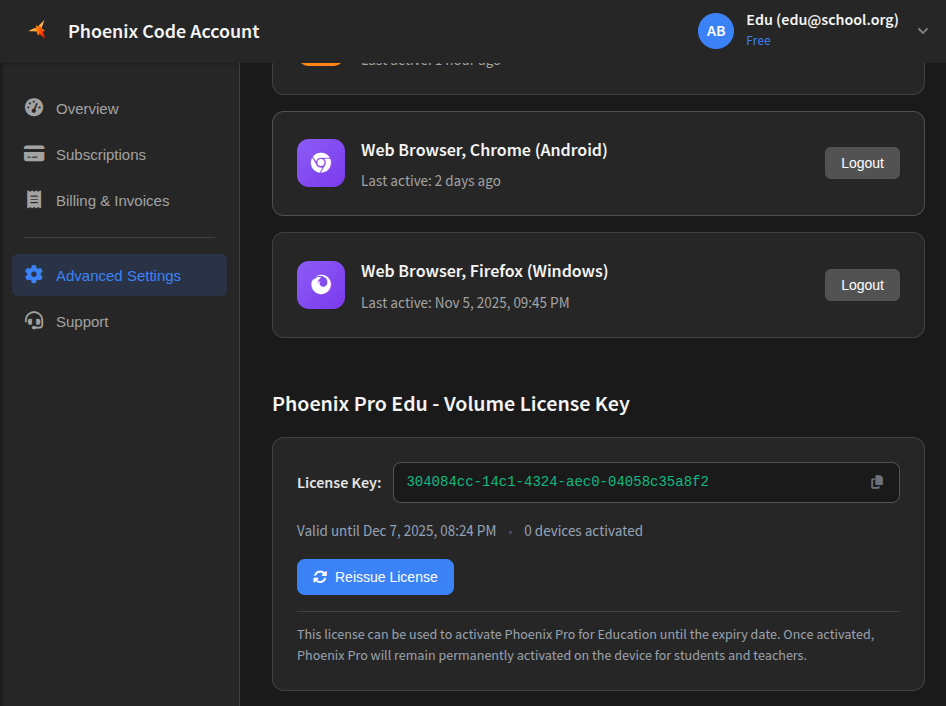
We will approve the school and assign management access to that admin account in:
The admin will find a new section under:
Advanced Settings → Phoenix Pro Edu - Volume License Key
From there, you can obtain the license key.
How Volume License Keys Work
- Each license key is valid for 2 weeks
- During these 2 weeks, you may activate unlimited devices:
- School-owned devices
- Lab computers
- Shared machines
- Student/teacher-owned devices (allowed)
- Once activated, a device stays Phoenix Pro permanently
- After the 2-week window, the key expires
- Admins can generate a new key at any time for new devices
This model ensures:
- Easy deployment
- Login is optional, no login required on each machine.
- The device now has Phoenix Pro permanently
- School admin may rotate(reissue) keys as needed
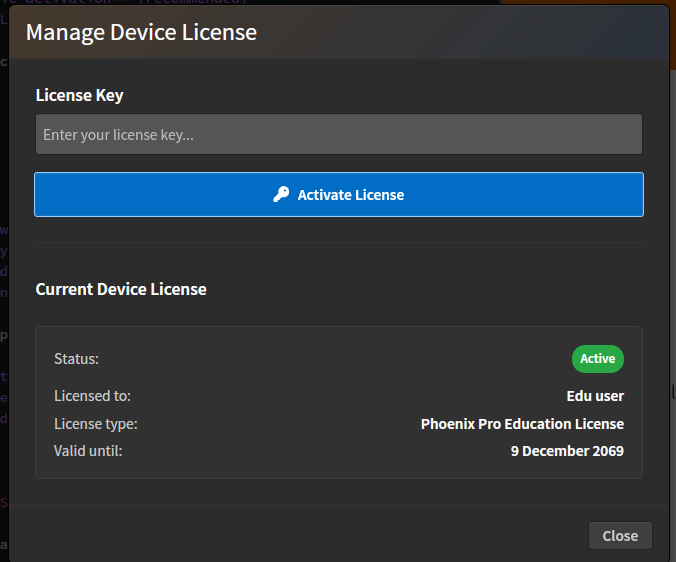
Activating Phoenix Pro Using a Volume License Key (Desktop App)
On any device—lab or student-owned:
- Open Phoenix Code Desktop
- Go to: Help → Manage Licenses
- Enter the Education Volume License Key
- Click Activate
Limitations
Students without school email and no school onboarding
If a student does not have a school-provided email and the school is not onboarded, we currently cannot issue individual student educational licenses.
Volume licenses must be requested by authorized school representatives
Students cannot request volume licenses directly without school/teacher approval.
Summary of Support Email Subjects
| Purpose | Subject Format |
|---|---|
| Onboarding a school domain | [education support] Request to onboard <School Name> |
| Requesting volume license | [educational license request for <School Name>] |
| Student account/license issues | [student license] <subject> |
| Other educational support | [education support] <subject> |
Use correct subjects for faster handling.
FAQ
Can students use the volume license on their personal laptops?
Yes. Schools may distribute the Education Volume License Key to activate student-owned devices.
Do device activations remain permanent?
Yes. Even after the license key expires, previously activated devices remain Phoenix Pro.
Can we issue new volume license keys whenever needed?
Yes. The admin can generate new 2-week activation keys anytime.
Can teachers use Phoenix Pro for personal/professional work?
Yes — as long as they use their school email.
Is Phoenix Pro free for commercial educational projects?
Yes. Students and teachers may use Phoenix Pro for any purpose.
Need Help?
Support options:
- Discussions: https://github.com/orgs/phcode-dev/discussions/new/choose
- Email: support@core.ai
We are committed to supporting educators and institutions worldwide.